
L'essentiel
Pour virer l’argent de Vinted sur votre compte, ouvrez votre porte-monnaie Vinted et touchez « Transférer vers un compte bancaire ». Il faut d’abord avoir ajouté un IBAN à votre nom (Paramètres > Paiements). Le virement met jusqu’à 5 jours ouvrés à arriver, et le montant minimum est de 0,10 €.
Seul l’argent « disponible » peut être transféré : celui d’une vente devient disponible une fois la commande validée par l’acheteur. Voici le pas-à-pas, la chronologie complète entre la vente et l’argent sur votre compte, et quoi faire si le virement n’arrive pas.
Étape 1 : activer le porte-monnaie et ajouter votre IBAN
Activer le porte-monnaie (si ce n’est pas déjà fait) : icône de profil > « Mon porte-monnaie » > « Activer mon Porte-monnaie Vinted ». Vinted demande votre nom complet, nationalité, date de naissance et adresse. Ne bâclez pas cette étape : vous ne pourrez pas modifier vous-même nom et date de naissance ensuite (il faudra passer par le support).
Ajouter le compte bancaire : icône de profil > Paramètres > Paiements > dans les moyens de versement, « Ajouter un compte bancaire ». Renseignez :
- le nom complet du titulaire, identique au nom de votre porte-monnaie ;
- l’IBAN sans espaces ;
- votre adresse de facturation.
Votre banque peut vous demander de valider l’opération (authentification forte). Les règles à respecter (centre d’aide Vinted) : un compte en euros, dans une banque de l’Union européenne ou de l’Espace économique européen, à votre nom, et qui n’est pas déjà lié à un autre profil Vinted.
Si Vinted refuse votre IBAN, la cause est presque toujours dans cette liste. Notre guide compte bancaire invalide sur Vinted passe chaque cas en revue.
Étape 2 : lancer le virement
- Ouvrez votre porte-monnaie Vinted (depuis votre profil).
- Touchez « Transférer vers un compte bancaire ».
- Vérifiez le montant et le compte de destination, puis confirmez.
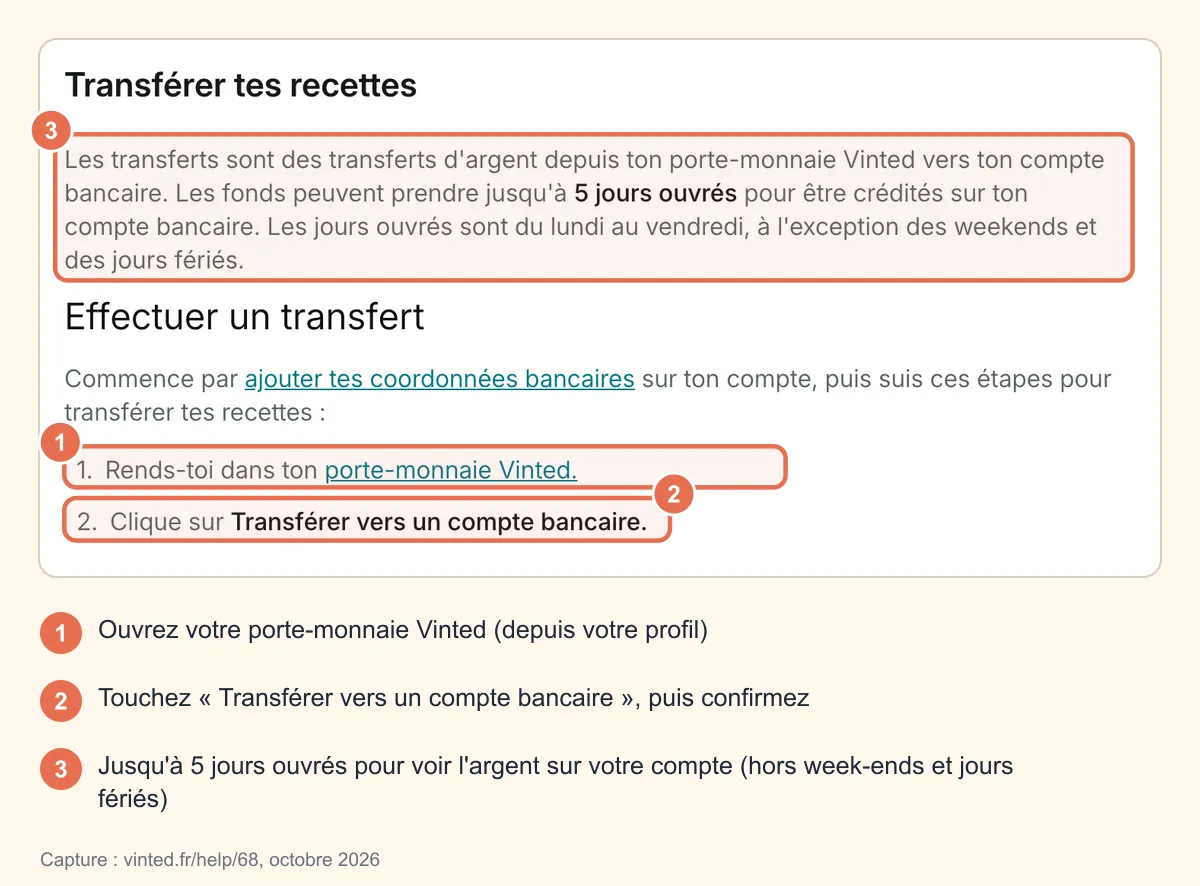
Vous pouvez transférer à partir de 0,10 €. Un virement lancé ne peut pas être annulé : vérifiez le compte avant de valider.
Pour retrouver vos anciens transferts : porte-monnaie > « Historique », puis choisissez l’année. Chaque ligne indique le montant, la date de lancement, le compte (partiellement masqué) et la date d’arrivée prévue ou effective.
Combien de temps entre la vente et l’argent sur votre compte ?
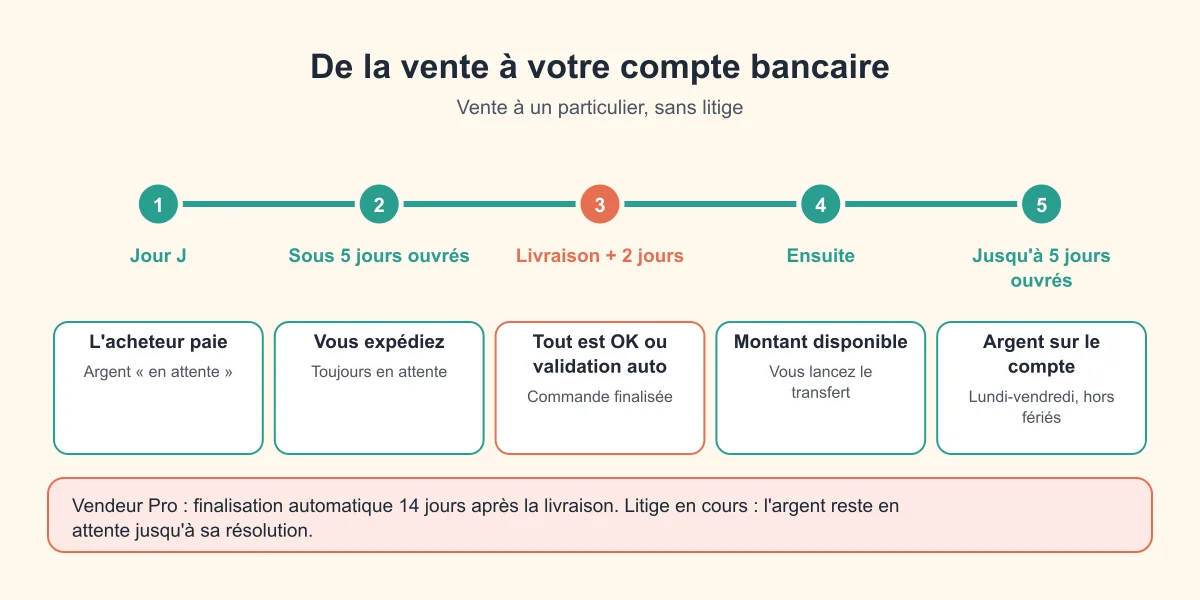
C’est la vraie question derrière « délai virement Vinted ». Le virement lui-même prend jusqu’à 5 jours ouvrés, mais il ne peut démarrer qu’une fois l’argent disponible.
| Étape | Délai | Statut dans le porte-monnaie |
|---|---|---|
| L’acheteur paie | Jour J | « Montant en attente » |
| Vous expédiez | 5 jours ouvrés maximum | En attente |
| Livraison + avis de l’acheteur | 2 jours après la livraison pour cliquer « Tout est OK » ou « J’ai un problème » | En attente |
| Commande finalisée | Au clic « Tout est OK » ou automatiquement après 2 jours | Passe en « Montant disponible » |
| Virement vers la banque | Jusqu’à 5 jours ouvrés | Visible dans l’Historique |
Les jours ouvrés, ce sont les jours du lundi au vendredi, hors jours fériés. Un virement lancé un vendredi soir n’avance donc pas le week-end.
Vendeur Pro ? La commande est finalisée automatiquement 14 jours après la livraison, pas avant. Comptez donc au moins deux semaines entre livraison et argent disponible.
Un litige en cours ? L’argent reste bloqué en attente tant qu’il n’est pas réglé. Voir notre guide litige et remboursement Vinted.
Y a-t-il des frais ? Un virement instantané ?
- Frais de virement : le centre d’aide Vinted ne mentionne aucun frais pour transférer votre argent vers votre banque.
- Virement instantané : Vinted n’en parle pas dans son centre d’aide en octobre 2026. Partez sur le délai officiel de jusqu’à 5 jours ouvrés.
- Frais d’inactivité : attention si vous laissez dormir de l’argent. Un porte-monnaie sans aucune activité (ni achat, ni vente, ni virement) pendant 24 mois d’affilée et qui contient encore de l’argent peut être prélevé de 30 € par an par Mangopay. Vous êtes prévenu par e-mail deux mois avant (source Vinted). Un simple virement suffit à éviter ça.
Autre détail : l’argent disponible est utilisé automatiquement pour payer vos prochains achats Vinted. Si vous préférez le garder pour votre banque, virez-le avant de faire du shopping. On détaille ce fonctionnement dans le porte-monnaie Vinted.
Vérification d’identité : pourquoi Vinted vous la demande
Vinted travaille avec deux prestataires de paiement réglementés : Mangopay (Luxembourg) et Vinted Pay (Lituanie). Ils peuvent vous demander une pièce d’identité, un selfie, un relevé bancaire ou un justificatif de domicile, par exemple :
- à l’activation du porte-monnaie ;
- quand vous dépassez certains seuils de ventes ;
- pour un virement important (Vinted cite l’exemple d’un transfert unique de 1 000 € ou plus) ;
- en cas d’activité inhabituelle.
Tant que la vérification n’est pas faite, les virements sont suspendus. Si elle vous est demandée après votre première vente, vous avez 5 jours ouvrés pour la faire, sinon la commande est annulée.
À noter : avec les nouvelles conditions entrées en vigueur le 5 octobre 2026, Vinted prévoit de faire passer les porte-monnaie de Mangopay à Vinted Pay ; Vinted annonce que ce changement ne coûte rien de plus aux membres.
Le virement n’arrive pas : que faire ?
- Attendez la fin des 5 jours ouvrés. Comptez à partir du lancement, sans les week-ends ni jours fériés.
- Cherchez le bon libellé sur votre relevé. Le virement peut apparaître sous le nom « Vinted », « Vinted Pay », « Adyen », « Mangopay » ou « Leechy ». Pour décoder un libellé « MGP » sur votre relevé, voyez MGP Vinted : c’est quoi ?.
- Vérifiez l’Historique du porte-monnaie : date d’arrivée prévue, compte de destination.
- Toujours rien ? Contactez Vinted via « Nous contacter » avec la date du virement et des captures de vos relevés bancaires, de la date du virement à aujourd’hui. Les captures doivent montrer votre nom complet, votre numéro de compte, les coordonnées de la banque et la date du relevé (source).
Et si l’IBAN était faux ou le compte fermé ? Si le compte n’existe pas ou a été clôturé, l’argent revient dans votre porte-monnaie sous 14 jours calendaires. S’il s’agit d’un compte qui n’est pas à votre nom, le retour peut prendre jusqu’à 15 jours ouvrés.
Pour joindre le support plus efficacement, voir contacter le service client Vinted.
Les erreurs qui retardent votre argent
- Mettre l’IBAN d’un proche : le nom doit correspondre à celui du porte-monnaie.
- Laisser des espaces dans l’IBAN ou se tromper d’un caractère.
- Ignorer la demande de vérification d’identité : tout est gelé tant qu’elle n’est pas faite.
- Croire que l’argent « en attente » est perdu : il attend juste la validation de la commande.
- Cliquer sur un lien reçu par e-mail ou SMS pour « débloquer » un virement : c’est une technique d’hameçonnage classique. Modifiez vos coordonnées bancaires uniquement dans l’appli officielle.
Vous vendez régulièrement ? Pensez à garder une trace de vos virements : l’Historique du porte-monnaie est pratique pour faire vos comptes, et notre calculateur de bénéfices Vinted aide à savoir ce qu’il vous reste vraiment. Côté impôts, tout est expliqué dans obligations fiscales sur Vinted.
Questions fréquentes
Combien de temps prend un virement Vinted ?
Jusqu’à 5 jours ouvrés après le lancement du transfert. Mais l’argent d’une vente n’est transférable qu’une fois la commande finalisée (au plus tard 2 jours après la livraison chez un particulier).
Le virement Vinted est-il payant ?
Vinted ne mentionne aucun frais de transfert vers un compte bancaire. Le seul frais documenté est celui d’inactivité (30 € par an) sur un porte-monnaie resté inactif 24 mois avec de l’argent dessus.
Peut-on faire un virement instantané depuis Vinted ?
Vinted ne propose pas officiellement de virement instantané dans son centre d’aide. Le délai annoncé est de jusqu’à 5 jours ouvrés.
Pourquoi mon argent est-il « en attente » ?
Parce que la commande n’est pas encore finalisée : l’acheteur n’a pas encore confirmé la réception, le délai de 2 jours n’est pas écoulé, ou un problème a été signalé.
Comment changer de compte bancaire sur Vinted ?
Dans Paramètres > Paiements, à la rubrique des moyens de versement. Votre banque peut vous demander une validation, et le nouveau compte doit être à votre nom, en euros, dans une banque de l’UE ou de l’EEE.
Peut-on virer l’argent Vinted sur le compte de quelqu’un d’autre ?
Non. Le titulaire du compte doit avoir le même nom que le porte-monnaie Vinted. Un virement vers un compte qui n’est pas le vôtre peut être rejeté et mettre jusqu’à 15 jours ouvrés à revenir.