
L'essentiel
Pour supprimer votre compte Vinted, allez dans Profil > Paramètres > Paramètres du compte, appuyez sur « Supprimer mon compte », cochez la case confirmant que toutes vos commandes sont terminées, puis confirmez. Le compte est désactivé immédiatement et devient invisible pour les autres membres.
Avant de cliquer : terminez vos commandes et transférez le solde de votre porte-monnaie vers votre banque, car vous n’y aurez plus accès ensuite. Et si vous changez d’avis, Vinted laisse 3 mois pour restaurer le compte.
Supprimer son compte sur l’application (iOS et Android)
- Appuyez sur Profil dans la barre du bas.
- Appuyez sur Paramètres, puis Paramètres du compte.
- Appuyez sur Supprimer mon compte (tout en bas).
- Cochez la case confirmant que vous avez terminé toutes vos commandes.
- Appuyez à nouveau sur Supprimer mon compte.
Supprimer son compte sur ordinateur (vinted.fr)
- Cliquez sur votre photo de profil, puis Mes paramètres dans le menu.
- Cliquez sur Paramètres du compte.
- Sélectionnez Supprimer mon compte.
- Cochez la case de confirmation, puis cliquez sur Supprimer mon compte.
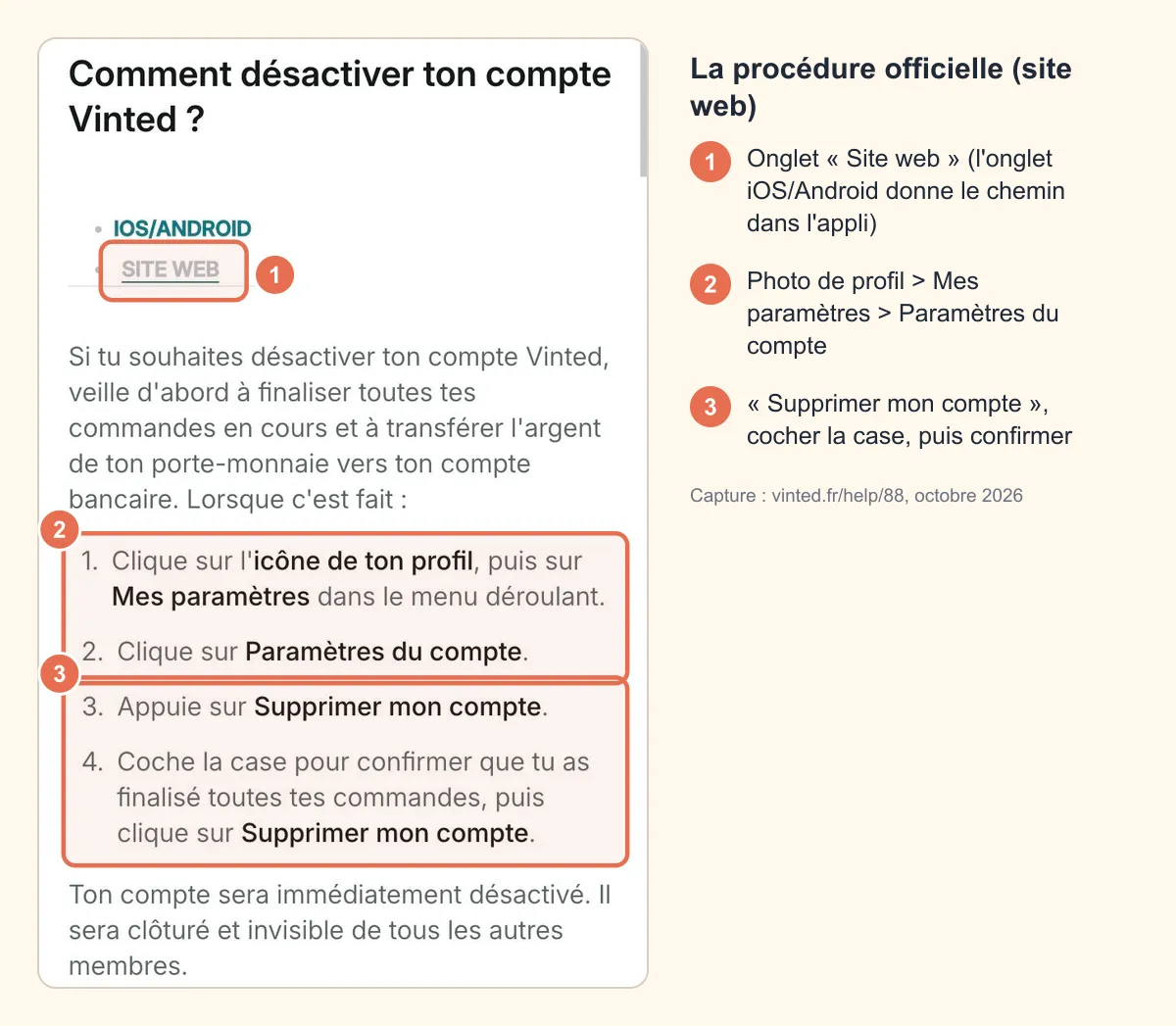 Capture : vinted.fr/help/88, octobre 2026
Ces étapes sont celles de l’article officiel Comment désactiver ton compte Vinted ?.
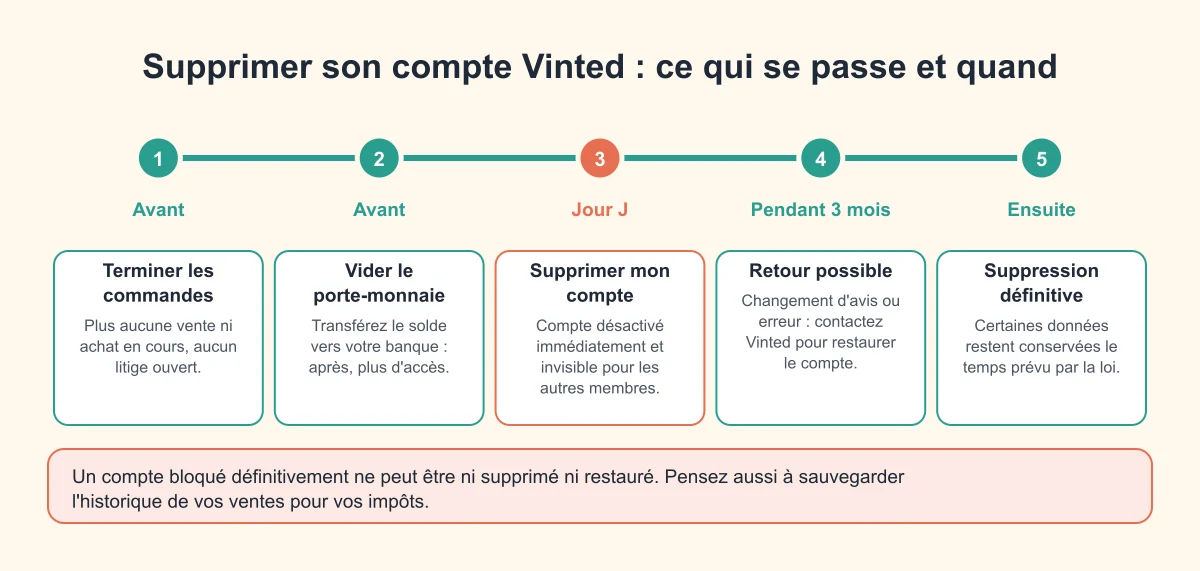
La checklist avant de supprimer
| À faire | Pourquoi |
|---|---|
| Terminer toutes les ventes et tous les achats | La case de confirmation l’exige, et vous perdez l’accès aux commandes |
| Attendre la finalisation des dernières ventes | L’argent n’arrive dans le porte-monnaie qu’une fois la commande finalisée |
| Transférer le solde vers votre compte bancaire | Après désactivation, plus d’accès au porte-monnaie |
| Clôturer les litiges en cours | Un litige ouvert bloque l’argent et la commande |
| Sauvegarder l’historique de vos ventes | Utile pour vos impôts (voir plus bas) |
| Demander une copie de vos données si besoin | Droit d’accès RGPD, à exercer avant la fermeture |
Pour le transfert du solde, suivez notre guide virement Vinted vers votre compte bancaire. Si une vente reste « en attente », c’est que l’acheteur n’a pas encore validé : l’argent est libéré une fois la commande finalisée (2 jours après la livraison en l’absence de problème signalé, d’après le fonctionnement du porte-monnaie).
Ce qui se passe après la suppression
- Immédiatement : le compte est désactivé, fermé et invisible pour les autres membres. Vous n’avez plus accès à votre porte-monnaie ni à vos commandes.
- Pendant 3 mois : vous pouvez faire restaurer le compte (changement d’avis ou suppression par erreur) en contactant Vinted.
- Ensuite : Vinted conserve certaines données personnelles pendant une durée limitée, pour protéger la plateforme et respecter ses obligations comptables, conformément à sa politique de confidentialité.
Point à connaître : si vous exercez votre droit à l’effacement des données, Vinted précise que vous pourriez ne plus pouvoir ouvrir de nouveaux litiges ni recevoir de notifications sur les litiges existants.
Cas particuliers
Vous ne pouvez plus vous connecter
Essayez d’abord « Mot de passe oublié ». Si l’accès est vraiment perdu (e-mail inaccessible, compte piraté), contactez Vinted via le Centre d’aide en fournissant votre pseudo, l’adresse e-mail du compte et les informations demandées pour prouver qu’il vous appartient. Vinted désactive le compte après vérification. Le chemin vers le support est détaillé dans contacter le service client Vinted.
Votre compte est bloqué
Un compte bloqué définitivement ne peut être ni supprimé ni restauré, pour des raisons de sécurité. S’il s’agit d’une suspension que vous estimez injustifiée, contestez d’abord la décision avec le lien reçu (dans les 6 mois). Voir notre guide compte Vinted bloqué.
| Suppression volontaire | Blocage par Vinted | |
|---|---|---|
| Qui décide | Vous | Vinted (non-respect des règles) |
| Accès au porte-monnaie | À vider avant de supprimer | Peut être suspendu |
| Retour en arrière | Possible pendant 3 mois | Recours via le lien de contestation |
| Suppression possible | Oui | Non si le blocage est définitif |
Supprimer son compte pour en recréer un
C’est possible, mais vous repartez de zéro : plus d’évaluations, plus d’historique. Et un numéro de téléphone ne peut être rattaché qu’à un seul compte Vinted (aide Vinted) : si le numéro ou l’e-mail est refusé à l’inscription, contactez le support plutôt que de multiplier les tentatives. Vous voulez juste changer de pseudo ? Pas besoin de tout supprimer : voir changer de pseudo sur Vinted.
Supprimer son compte et les impôts
Fermer le compte n’efface pas vos obligations fiscales sur les ventes passées. Depuis la directive européenne DAC7, Vinted transmet chaque année à l’administration fiscale les données des vendeurs qui atteignent 30 ventes ou 2 000 € de ventes sur l’année civile. Exportez ou notez votre historique de ventes (dates, prix) avant de supprimer : sans compte, impossible de le reconstituer. Plus d’infos dans obligations fiscales Vinted.
Pas sûr de vouloir supprimer ? Les alternatives
- Faire une pause : masquez vos annonces (menu ⋮ de l’annonce > Masquer) ou activez le mode vacances, qui met vos articles en pause jusqu’à 90 jours : vous gardez vos évaluations et votre historique.
- Trop de notifications ou d’e-mails : réglez-les dans Paramètres > Notifications.
- Simplement quitter l’appli sur un appareil : déconnectez-vous, voir se déconnecter de Vinted.
- Désinstaller l’application ne supprime pas le compte : vos annonces restent en ligne et achetables.
Questions fréquentes
Comment supprimer définitivement un compte Vinted ?
Profil > Paramètres > Paramètres du compte > Supprimer mon compte, puis confirmez. Le compte est désactivé tout de suite ; Vinted laisse 3 mois pour le restaurer sur demande, puis il n’est plus récupérable.
Combien de temps faut-il pour supprimer un compte Vinted ?
La désactivation est immédiate. Vous gardez ensuite 3 mois pour revenir en arrière en contactant Vinted. Certaines données sont conservées plus longtemps, selon les obligations légales de Vinted.
Pourquoi je n’arrive pas à supprimer mon compte Vinted ?
Le plus souvent, une commande est encore en cours, un litige est ouvert ou de l’argent reste dans le porte-monnaie. Terminez-les, transférez le solde, puis réessayez. Un compte bloqué définitivement, lui, ne peut pas être supprimé.
Peut-on supprimer un compte Vinted sans se connecter ?
Oui, en contactant le support Vinted avec votre pseudo, l’adresse e-mail du compte et les informations demandées pour vérifier que le compte est bien le vôtre. Essayez d’abord la réinitialisation du mot de passe.
Que deviennent mes annonces et mon argent ?
Les annonces disparaissent avec le compte, devenu invisible. L’argent du porte-monnaie n’est plus accessible après la désactivation : transférez-le vers votre banque avant de supprimer.