
L'essentiel
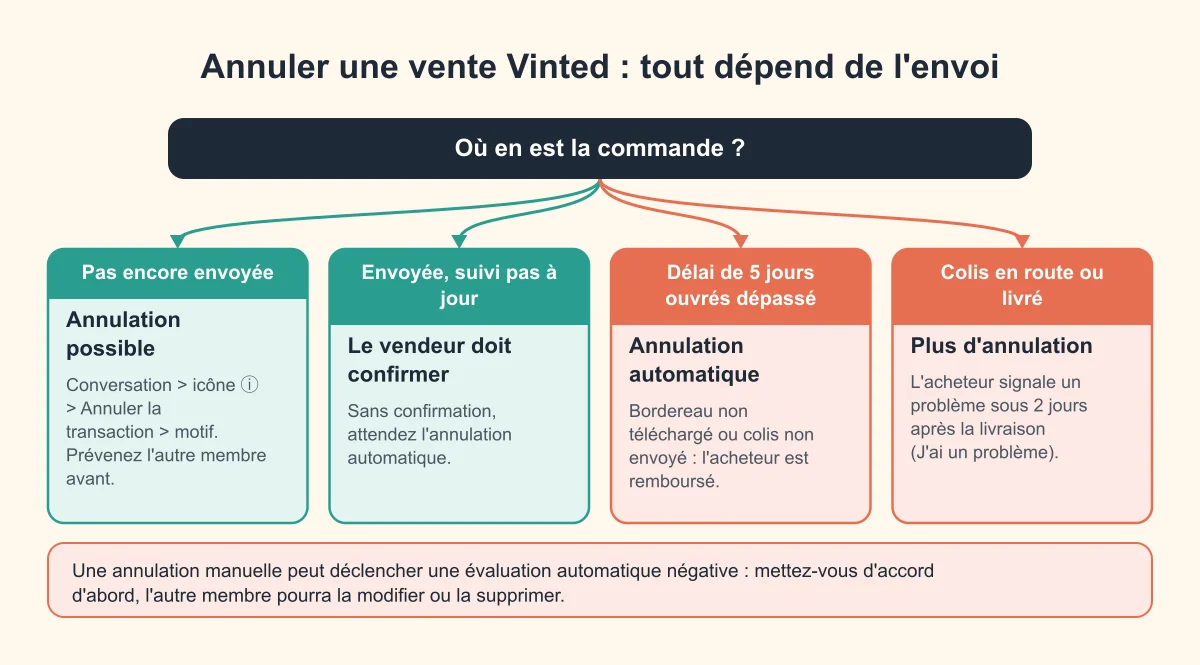
Sur Vinted, une vente peut être annulée par le vendeur comme par l’acheteur, mais seulement tant que le colis n’est pas parti. Ouvrez la conversation avec l’autre membre, appuyez sur l’icône ⓘ en haut à droite, puis sur Annuler la transaction, et choisissez un motif. L’acheteur est remboursé automatiquement (quelques heures sur le porte-monnaie Vinted, jusqu’à 5 jours ouvrés sur une carte) et le vendeur peut remettre l’article en vente avec Republier.
Le piège, c’est l’évaluation : celui qui annule à la main reçoit en principe une évaluation automatique négative. La parade est simple : se mettre d’accord avec l’autre membre avant d’annuler, pour qu’il puisse ensuite la modifier ou la supprimer. Voici tous les cas, le tableau pour savoir où vous en êtes, et les messages à copier.
Pouvez-vous encore annuler ? Le tableau de décision
Trouvez votre situation dans la première colonne : le reste de la ligne vous dit qui peut agir, ce que devient l’argent et ce qui arrive aux évaluations.
| Où en est la commande ? | Qui peut annuler | Comment | L’argent | L’évaluation |
|---|---|---|---|---|
| Payée, bordereau pas encore téléchargé | Vendeur ou acheteur | ⓘ > Annuler la transaction | Remboursement intégral et automatique de l’acheteur | Négative automatique pour celui qui annule, modifiable si accord |
| Bordereau téléchargé, colis pas encore déposé | Vendeur ou acheteur | Idem | Idem | Idem |
| Colis déposé, mais suivi pas encore à jour | L’acheteur demande, le vendeur doit confirmer | Sinon, attendre l’annulation automatique | Remboursement après annulation | Idem |
| Rien d’envoyé après 5 jours ouvrés | Vinted, automatiquement | Rien à faire | Remboursement automatique | Négative automatique pour le vendeur |
| Colis en route ou livré | Personne | Plus de bouton : à la livraison, J’ai un problème sous 2 jours si l’article pose problème | Remboursé seulement si la réclamation aboutit | Les deux membres s’évaluent normalement |
| Achat reçu d’un vendeur Pro | Pas d’annulation | Droit de rétractation de 14 jours via J’ai un problème | Remboursé au retour de l’article | Normale |
| Paiement fait en dehors de Vinted (virement, PayPal, espèces) | Personne côté Vinted | Vinted ne peut pas annuler ces ventes | Rien n’est garanti | Aucune |
Sources : Annuler une transaction, La commande a été annulée, évaluations, droit de rétractation et article affiché comme vendu.
Comment annuler une vente sur Vinted (vendeur)
La marche à suivre
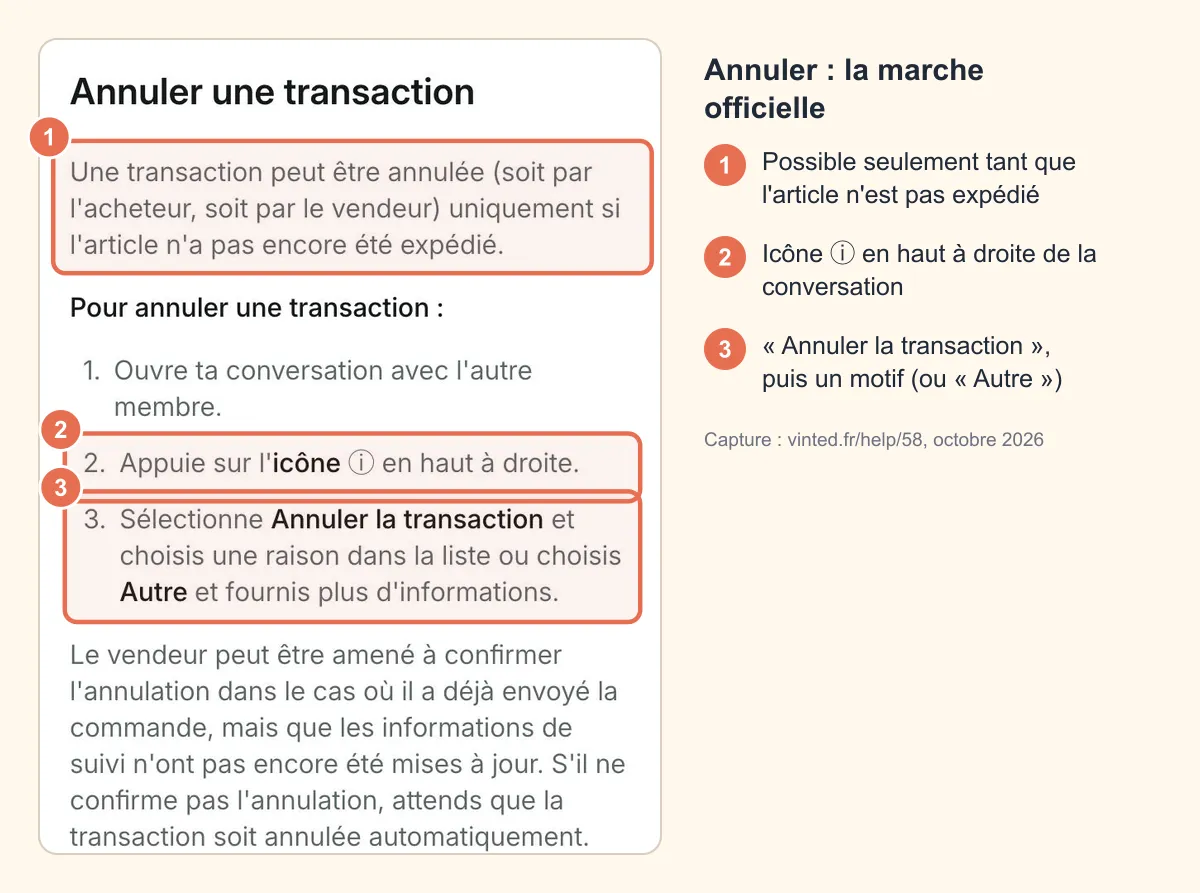
- Ouvrez la conversation avec l’acheteur (onglet Messages, ou Profil > Mes ventes et achats).
- Appuyez sur l’icône ⓘ en haut à droite.
- Choisissez Annuler la transaction.
- Sélectionnez un motif dans la liste, ou « Autre » en ajoutant une précision.
- Confirmez.
C’est la procédure décrite par Vinted dans son article Annuler une transaction. Elle fonctionne de la même façon dans l’application et sur vinted.fr.
 Capture : vinted.fr/help/58, octobre 2026
Avant d’annuler : les alternatives
Annuler n’est pas toujours la meilleure option. Selon votre cas :
- Vous manquez de temps pour envoyer ? Dans la conversation, appuyez sur Prolonger le délai d’envoi (ou ⓘ > Prolonger le délai d’envoi), choisissez 3 ou 5 jours ouvrés de plus, ajoutez une raison si vous voulez, puis Demander une prolongation. L’acheteur peut accepter ou refuser (aide Vinted).
- Vous avez déjà déposé le colis mais le suivi ne bouge pas ? Le suivi peut mettre jusqu’à 48 heures à apparaître. Cliquez sur Je confirme avoir bien envoyé la commande pour éviter une annulation automatique.
- Vous partez quelques jours ? Activez le mode vacances : vos annonces sont masquées jusqu’à 90 jours et personne ne peut les acheter.
Quel motif choisir ?
Choisissez le motif qui correspond vraiment à la situation : article abîmé ou introuvable, vendu ailleurs, erreur de prix, accord avec l’acheteur… Le motif informe l’acheteur ; un motif honnête et un petit message d’explication limitent les mauvaises évaluations. Attention : choisir un motif d’accord ne supprime pas à lui seul l’évaluation automatique, c’est l’autre membre qui doit la modifier.
Ce que l’annulation vous coûte
En argent, rien : c’est l’acheteur qui a payé l’article, le port et les frais Vinted, et tout lui est remboursé (aide Vinted). Vous perdez simplement la vente et, sans accord, vous héritez d’une évaluation négative qui pèse sur votre note moyenne.
Et après l’annulation ?
- L’article reste masqué jusqu’à ce que vous le republiiez : bouton Republier directement dans la conversation.
- Pensez à corriger l’annonce si l’annulation venait d’une erreur (prix, taille, défaut non mentionné). Voir modifier le prix d’un article Vinted.
- Si l’acheteur a annulé, demandez-lui s’il est toujours intéressé : Vinted rappelle que certains acheteurs annulent par erreur (mauvaise adresse ou mauvais mode d’envoi).
Comment annuler un achat sur Vinted (acheteur)
Le chemin est le même : conversation > ⓘ > Annuler la transaction > motif. D’après Vinted, l’acheteur peut annuler tant que le vendeur n’a pas expédié : qu’il n’ait pas encore ouvert les instructions d’envoi et téléchargé le bordereau, ou qu’il l’ait téléchargé sans avoir encore envoyé l’article (aide Vinted).
Trois situations particulières :
- Le vendeur a déjà déposé le colis mais le suivi n’est pas à jour : il doit confirmer l’annulation. S’il ne le fait pas, il faut attendre l’annulation automatique.
- Le vendeur ne répond pas et n’envoie rien : inutile d’annuler vous-même. Sans bordereau téléchargé ni envoi dans les 5 jours ouvrés, Vinted annule la commande le jour ouvré suivant et vous rembourse. En attendant, vous évitez l’évaluation négative liée à une annulation manuelle. Tout le détail dans notre guide colis payé mais non envoyé.
- Vous vous êtes trompé de mode de livraison ou d’adresse : une fois payé, ça ne se modifie pas. Il faut annuler (avec l’accord du vendeur) et repasser commande.
Les cas où l’annulation est impossible
- Le colis est parti : le bouton disparaît, la commande va jusqu’à la livraison.
- La commande est finalisée (l’acheteur a confirmé que tout va bien, ou les 2 jours après livraison sont passés) : l’argent est chez le vendeur.
- La vente s’est faite hors du bouton Acheter (virement, PayPal, espèces, bouton « Indiquer comme vendu ») : Vinted indique qu’il ne peut pas annuler ces commandes ni intervenir en cas de problème (aide Vinted).
- Vous avez juste changé d’avis après réception : un article conforme qui ne convient pas (taille, couleur) n’est pas remboursable entre particuliers (politique de remboursement). L’acheteur peut seulement demander un retour, que le vendeur est libre de refuser.
Les annulations automatiques par Vinted
D’après le Centre d’aide Vinted, une commande est annulée automatiquement si le vendeur :
- ne télécharge pas le bordereau d’envoi dans les 5 jours ouvrés ;
- n’envoie pas l’article dans les 5 jours ouvrés ;
- envoie l’article avec un autre mode d’envoi que celui choisi par l’acheteur ;
- ne clique pas sur Je confirme avoir bien envoyé la commande quand il utilise un mode d’envoi personnalisé.
L’annulation intervient le jour ouvré suivant le délai et peut mettre jusqu’à un jour à être traitée (aide Vinted). Si le vendeur expédie après la date limite mais avant l’annulation, Vinted demande à l’acheteur de refuser le colis pour qu’il retourne au vendeur.
Vinted peut aussi annuler la commande quand l’article est perdu, endommagé ou non conforme, après un signalement de l’acheteur via J’ai un problème, ou quand un article acheté avec la vérification échoue au contrôle.
Ce que devient l’argent après une annulation
Le remboursement revient toujours sur le moyen de paiement utilisé, et il couvre tout : prix de l’article, frais de port et frais Vinted (aide Vinted).
| Moyen de paiement de l’acheteur | Délai de remboursement |
|---|---|
| Porte-monnaie Vinted | Quelques heures |
| Carte bancaire | Jusqu’à 5 jours ouvrés |
| Apple Pay / Google Pay | Jusqu’à 5 jours ouvrés |
| Paiement mixte (porte-monnaie + carte) | Quelques heures pour la part porte-monnaie, 5 jours ouvrés pour le reste |
Les jours ouvrés vont du lundi au vendredi, hors jours fériés : une annulation un vendredi soir peut donc apparaître sur la carte le vendredi suivant. Passé 5 jours ouvrés sans rien voir, Vinted conseille de contacter votre banque, puis le service client Vinted avec une capture du relevé bancaire couvrant la période depuis l’annulation (aide Vinted). Vous ne voyez qu’une partie de la somme ? C’est souvent un paiement mixte : le reste arrive sur la carte.
Côté vendeur, il n’y a rien à rembourser soi-même : Vinted et son prestataire de paiement s’en chargent, puisque l’argent était bloqué jusqu’à la fin de la commande.
Annulation et évaluations : ce qui se passe vraiment
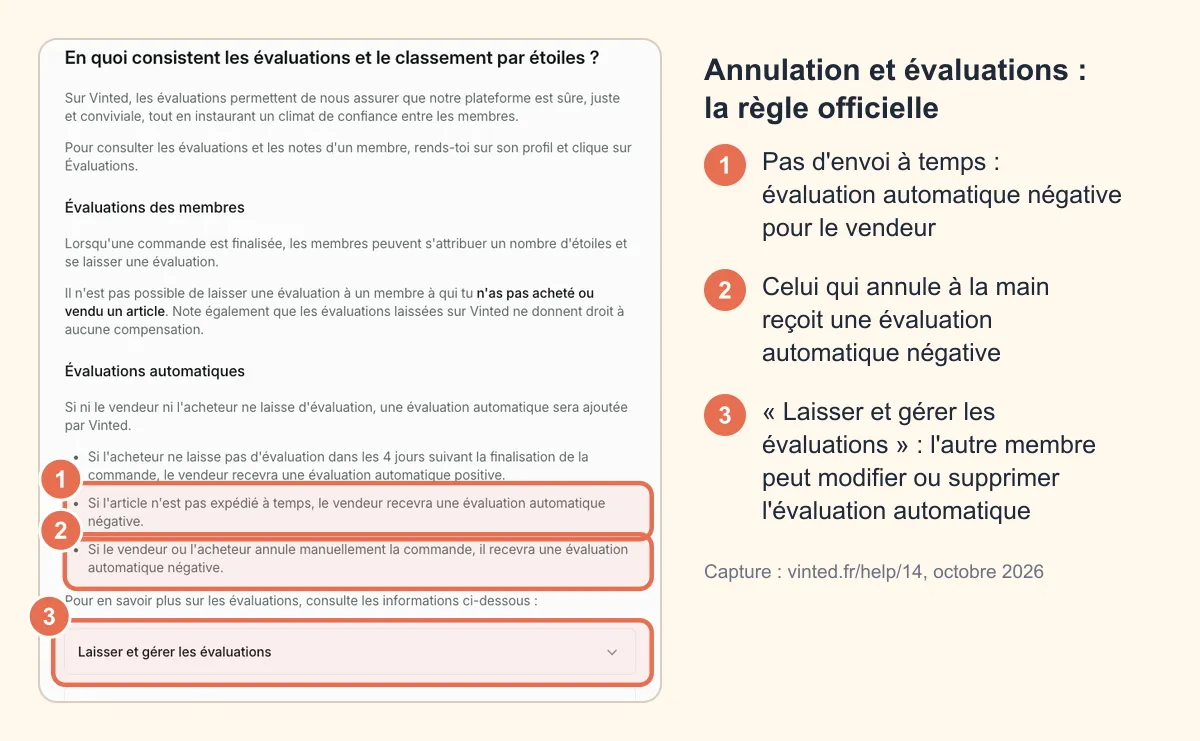
La page d’aide sur les évaluations est claire :
- Celui qui annule manuellement la commande reçoit une évaluation automatique négative.
- Si l’article n’est pas expédié à temps, c’est le vendeur qui reçoit une évaluation automatique négative.
- L’évaluation automatique est laissée par Vinted au nom de l’autre membre, qui peut la modifier ou la supprimer : il va sur votre profil, clique sur les étoiles, retrouve l’évaluation et choisit Modifier ou Supprimer.
- Vinted ne retire lui-même que les évaluations contraires aux règles de la communauté ou à la loi. Une évaluation négative « méritée » par une annulation reste, sauf si l’autre membre la change.
 Capture : vinted.fr/help/14, octobre 2026
D’où la règle d’or : message d’abord, annulation ensuite. Si l’évaluation négative apparaît quand même, vous pouvez y répondre publiquement (bouton Répondre) pour expliquer calmement la situation. Plus de détails dans notre guide sur les évaluations Vinted.
Messages prêts à copier
Vendeur → acheteur, avant d’annuler :
Bonjour [pseudo], je suis vraiment désolé(e) : en préparant votre colis, j’ai remarqué [défaut / problème] qui n’apparaissait pas sur l’annonce. Je préfère ne pas vous l’envoyer dans cet état. Seriez-vous d’accord pour que j’annule la commande ? Vous serez remboursé(e) intégralement et automatiquement. Encore pardon pour le contretemps !
Acheteur → vendeur, pour demander l’annulation :
Bonjour, je me suis trompé(e) de [taille / adresse / point relais] lors de ma commande. Si vous n’avez pas encore envoyé le colis, seriez-vous d’accord pour annuler ? Je peux repasser commande correctement juste après si l’article est toujours disponible. Merci beaucoup !
Après l’annulation, pour l’évaluation :
Merci pour votre compréhension ! Comme convenu, Vinted a ajouté une évaluation automatique négative suite à l’annulation. Pourriez-vous la supprimer depuis mon profil (clic sur les étoiles, puis Supprimer) ? Bonne journée !
Le colis est parti : que faire à la place ?
Une fois le colis expédié, la commande suit son cours, et c’est à la livraison que tout se joue :
- l’acheteur a 2 jours après la notification de livraison pour signaler un problème via J’ai un problème (article non conforme, endommagé) ;
- un article conforme qui ne convient pas n’est pas remboursable : l’acheteur peut seulement demander un retour au vendeur ;
- le droit de rétractation de 14 jours ne s’applique qu’aux achats auprès de vendeurs professionnels (badge Pro), pas entre particuliers (aide Vinted).
Et si c’est Vinted qui a annulé la commande alors que le colis était déjà déposé, la marche à suivre est dans vente annulée mais colis envoyé. Pour la suite (retour, remboursement partiel, contestation), voir comment retourner un article sur Vinted et notre guide litige et remboursement Vinted.
Erreurs à éviter
- Annuler sans prévenir : c’est la meilleure façon de récolter une évaluation négative.
- Laisser traîner la commande en espérant l’annulation automatique côté vendeur : l’acheteur attend jusqu’à 5 jours ouvrés pour rien, et vous recevez quand même une évaluation négative pour envoi en retard. Si vous savez que vous n’enverrez pas, prévenez et annulez tout de suite.
- Remettre l’article en main propre après un achat via le bouton Acheter : sans envoi, la commande sera annulée et l’acheteur remboursé (voir remise en main propre sur Vinted).
- Envoyer avec un autre transporteur que celui choisi par l’acheteur : motif d’annulation automatique.
- Accepter un « remboursement » hors Vinted proposé par l’autre membre (virement, lien de paiement) : l’annulation et le remboursement passent uniquement par l’application.
Questions fréquentes
Comment annuler une vente sur Vinted en tant que vendeur ?
Dans la conversation avec l’acheteur, appuyez sur l’icône ⓘ, puis « Annuler la transaction », choisissez un motif et confirmez. C’est possible uniquement avant l’envoi du colis. L’acheteur est remboursé automatiquement.
Peut-on annuler une vente Vinted sans évaluation négative ?
Pas directement : celui qui annule reçoit une évaluation automatique négative. Mais si vous vous mettez d’accord avec l’autre membre avant d’annuler, il peut ensuite la modifier ou la supprimer depuis votre profil.
Comment annuler une commande sur Vinted en tant qu’acheteur ?
Même chemin que le vendeur : conversation > ⓘ > « Annuler la transaction », tant que le colis n’est pas parti. Si le vendeur n’envoie rien, vous pouvez aussi attendre l’annulation automatique après 5 jours ouvrés, avec remboursement.
Combien de temps pour être remboursé après une annulation ?
Quelques heures si vous avez payé avec le porte-monnaie Vinted, jusqu’à 5 jours ouvrés par carte bancaire, Apple Pay ou Google Pay. Le remboursement inclut le prix, le port et les frais Vinted.
Le vendeur perd-il de l’argent s’il annule ?
Non. Le vendeur ne paie pas de frais sur une vente annulée avant l’envoi : l’acheteur est remboursé de tout par Vinted. Le vendeur perd seulement la vente, et risque une évaluation négative sans accord préalable.
Peut-on annuler une vente Vinted après l’envoi ?
Non. Une fois le colis expédié, il faut attendre la livraison. L’acheteur peut alors signaler un problème sous 2 jours si l’article est non conforme ou endommagé.